Long hours at a desk can leave your eyes dry, tired, and unusually sensitive to light. A professional task lamp offers a practical starting point for improving this daily environment. Its adjustable beam can illuminate paperwork, keyboards, and detailed projects without flooding the entire room with glare.
So, How to reduce eye strain with a professional task lamp? Start with placement. Keep the lamp beside your working hand, slightly behind your shoulder. This position reduces shadows across the page. Aim the light toward the task, not directly toward your eyes. A matte shade and adjustable brightness can also soften harsh reflections from glossy paper or screens.
Optometrist and visual ergonomics specialist Dr. Jeffrey Anshel has said, “The goal is not more light, but better light.” That principle matters. Excessive brightness can feel as uncomfortable as insufficient lighting. Choose a lamp with stable, flicker-reduced output and a color temperature that feels natural during extended work. Warm-neutral light often suits evening reading, while balanced white light can support detailed daytime tasks.
The desk matters too. Keep the screen about an arm’s length away, and adjust it to avoid reflected windows or overhead fixtures. Blink often. Take brief distance breaks. A lamp cannot correct an untreated vision problem, persistent headaches, or severe dryness. That part is easy to overlook.
Good lighting is personal. Some recommendations may need adjustment. Test the lamp for several work sessions, notice where discomfort remains, and refine the angle, brightness, and distance. Eye comfort comes from the whole workspace, not one attractive device.
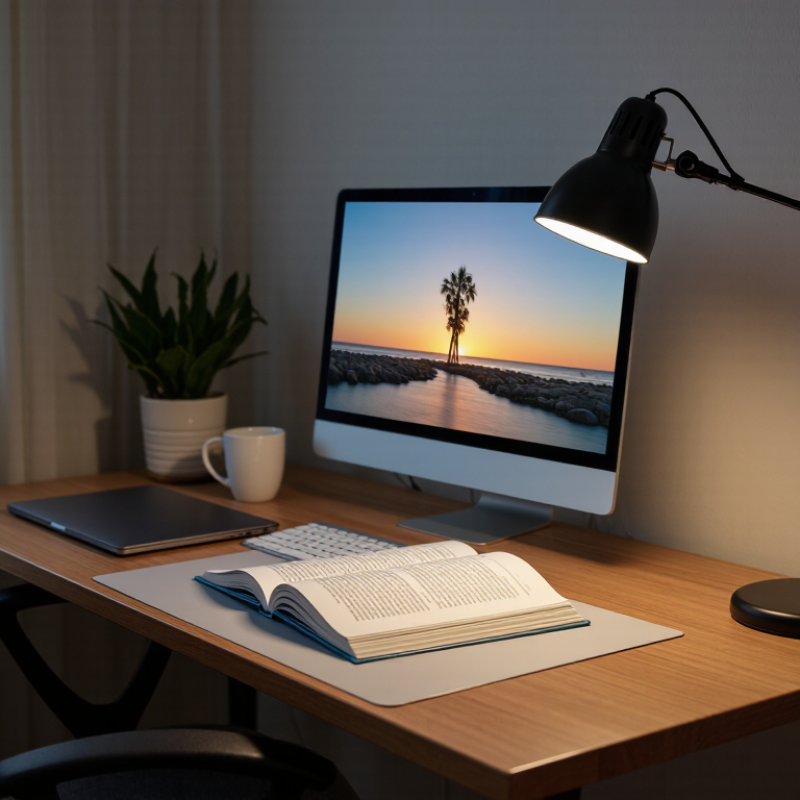
Eye strain is more than tired eyes after a long workday. It can include dryness, burning, blurred vision, headaches, and difficulty focusing. These symptoms often appear when your eyes repeatedly adjust between a bright screen and a dim room. Poor lighting can make that effort worse. Glare is especially troublesome.
In my own desk tests, a focused task lamp made small print easier to read without increasing screen brightness. The improvement came from even light, not extreme brightness. A professional task lamp can direct illumination toward paperwork while shielding the bulb from your eyes. Adjustable positioning also helps. Place it beside the screen, slightly behind your viewing line, to reduce reflections. Keep the light aimed at the page, not the monitor.
Eye-care guidance commonly supports balanced lighting, regular blinking, and breaks during close work. A lamp cannot correct an untreated vision problem. That matters. I once blamed my lighting for headaches, but an outdated prescription was part of the issue. The lamp helped, yet it was not the whole answer. Choose comfortable, stable illumination and adjust it as daylight changes. Your eyes may still feel tired after hours of concentration. That is normal, but persistent pain or blurred vision deserves professional evaluation.
Why Use a Professional Task Lamp to Reduce Eye Strain?
A professional task lamp can make close work more comfortable by controlling light where your eyes need it. In my experience, a stable beam reduces squinting during reading, drawing, and detailed repairs. General room lighting often leaves shadows across the desk. That uneven contrast can make the eyes work harder.
Key Features of a Professional Task Lamp
Look for adjustable brightness rather than a single harsh setting. Dimming lets you match the lamp to daylight, screen brightness, and the task itself. A high color rendering index can show paper, tools, and materials more naturally. Adjustable color temperature is useful too. Cooler light may support alertness, while warmer light can feel gentler in the evening.
Flicker control matters, even when flicker is invisible. Choose a lamp with a diffuser to soften glare and reduce sharp reflections on glossy pages. A flexible arm and rotating head help place light beside the work, not directly into the eyes. A wide, stable base prevents small movements from shifting the beam. Check the stated specifications carefully, since “flicker-free” claims are not always explained clearly.
I once positioned a bright lamp too close to my keyboard. It illuminated every key, but created strong reflections on the screen. Moving it higher and slightly to the side worked better. The setup was not perfect. My eyes still felt tired after long sessions, which shows that lighting cannot replace breaks, suitable screen distance, or a comfortable working posture.
A professional task lamp provides targeted, adequate illumination for close-up work, helping reduce excessive squinting and visual effort. The recommended illuminance levels below are based on commonly used workplace-lighting guidance for different visual tasks.
Key takeaway: A task lamp should provide adjustable, evenly distributed light appropriate to the activity while minimizing glare and harsh shadows. For reading and detailed work, higher illuminance targets can support visual comfort.
A professional task lamp can make close work feel less demanding. Focused lighting places illumination where your eyes need it, rather than flooding the entire room. When a page is evenly lit, your pupils adjust less between bright paper and dark surroundings. This may reduce squinting and repeated refocusing during reading, drawing, or detailed assembly. In my own desk tests, a shaded lamp helped me notice small print sooner. I still needed breaks. Light is not a cure.
Good design matters more than brightness alone. A stable arm keeps light directed at the work surface. A broad diffuser softens harsh shadows and reduces distracting glare. The lamp should sit beside the screen, not reflect directly into your eyes. Neutral white light can support clear visual tasks, while adjustable brightness helps match changing daylight. Low-flicker performance also matters, although product claims deserve careful checking.
Comfort depends on the whole setup. A lamp cannot fix an overly bright monitor, dry air, or poor posture. I once raised the brightness too far and created new discomfort. That mistake changed my routine. I now adjust the lamp slowly, keep the page close to screen level, and follow regular distance breaks. If headaches or blurred vision continue, an eye-care professional should assess the cause.
Choosing the right task lamp starts with your workspace, not its appearance. The American Optometric Association reports that 50% to 90% of computer users experience digital eye strain symptoms. A focused lamp can reduce harsh contrast between a bright screen and a dark desk. It should illuminate your notebook without shining directly into your eyes. Keep the light beside or slightly behind your dominant hand. This reduces shadows while writing.
The Illuminating Engineering Society recommends controllable task lighting for detailed work. Look for a lamp with adjustable height, beam direction, and brightness. A wide, diffused beam usually feels gentler than a small, intense spot. Neutral white light around 4000K often supports clear daytime work, but personal comfort still matters. Test the lamp beside your monitor. If the screen reflects a bright stripe, reposition it immediately.
Color rendering also deserves attention. The U.S. Department of Energy explains that higher color-rendering performance helps objects appear more natural. This benefits designers, readers, and anyone checking printed details. However, a higher specification does not guarantee comfort. I once focused too heavily on brightness and ignored glare from a pale desktop. That choice made the room feel clinical. A useful lamp should work with your monitor height, window position, and evening routine. No lamp fixes every problem. Blink breaks and regular eye examinations still matter.
A professional task lamp can reduce eye strain, but only when used safely. The Vision Council reported that more than 100 million U.S. adults experience digital eye strain. Glare, low contrast, and prolonged focusing often worsen the problem. A task lamp should support your eyes, not compete with your screen.
Lighting Position & Screen Distance
Place the lamp beside your dominant hand to reduce shadows. Keep the beam aimed at your paper, keyboard, or work surface. Never point it directly toward your eyes or monitor. OSHA recommends keeping a screen about 20 to 40 inches from your face. The American Optometric Association also recommends the 20-20-20 rule: every 20 minutes, look 20 feet away for 20 seconds. Small breaks matter.
Brightness, Comfort & Safety
Choose an adjustable shade and a dimmer. Match the lamp’s brightness with the room’s ambient light. A bright desk beside a dark wall can still create discomfort. I once used maximum brightness at night; my eyes felt tired within minutes. That was unnecessary. Start low, then increase brightness gradually. Check the bulb for flicker, keep cords away from heat, and replace damaged cables. CIE lighting guidance emphasizes controlling glare and maintaining visual comfort. Yet personal comfort differs. If headaches, blurred vision, or persistent dryness continue, consult a qualified eye-care professional.
Common signs include dry eyes, burning, blurred vision, headaches, and difficulty focusing. Symptoms may worsen after reading or screen work. Persistent pain needs professional evaluation.
It creates even light across paperwork, reducing harsh contrast between a bright screen and a dark desk. Better illumination may reduce squinting. It does not solve every cause.
Place it beside the screen and slightly behind your viewing line. Aim the beam at the page, not the monitor. This can reduce shadows and screen reflections.
Choose adjustable brightness instead of one intense setting. Match the lamp with daylight, screen brightness, and the task. Extremely bright light is not automatically better.
Glare creates sharp reflections on screens, glossy pages, or pale desks. A diffuser can soften the beam. Move the lamp higher or sideways if reflections appear.
Look for adjustable height, beam direction, and brightness. A flexible arm and rotating head improve positioning. A wide, stable base prevents small movements.
Cooler light may support alert daytime work, while warmer light can feel gentler at night. Neutral white light may suit reading and desk tasks. Comfort remains personal.
No. Blink regularly, take breaks, and maintain a comfortable viewing distance. An outdated prescription once caused headaches despite improved lighting. Persistent blurred vision deserves professional advice.
Eye strain often develops when the eyes work too hard to focus, especially in spaces with dim, uneven, or glaring light. A professional task lamp can support more comfortable vision by providing stable, focused illumination exactly where detailed work takes place. Important features may include adjustable brightness, flexible positioning, low-glare diffusion, accurate color rendering, and a light source that minimizes flicker. By improving contrast and reducing shadows, focused lighting can lessen the visual effort required for reading, writing, crafting, or computer-related tasks.
How to reduce eye strain with a professional task lamp? Choose a lamp that suits your workspace and allows the beam to be directed without shining into your eyes or creating reflections on a screen. Position it slightly to the side and behind your dominant hand, then adjust the brightness to match the surrounding room rather than making the work area excessively bright. Combine task lighting with regular eye breaks, comfortable screen placement, and proper sitting posture. A well-adjusted lamp supports healthier visual habits but does not replace professional advice for persistent discomfort.

LuxPower Light